
How to Register for St. Johns Virtual Courses Year Round
What's the Difference Between Full Time/Part Time/SJVS/FLVS and Home Education?
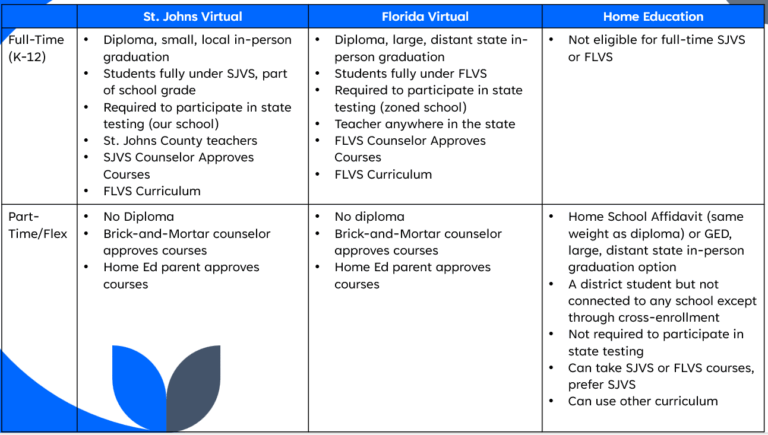
If you are a brick-and-mortar student wanting to have a blended schedule (some courses at school, some online).
- Talk to your school counselor to see if this is possible.
- If approved, sign up for virtual courses by following these directions for secondary (grades 6-12) and these directions for elementary (grades K-5). We ask that you consider selecting St. Johns Virtual, but you do have the option to select Florida Virtual. Below are reasons why you may consider choosing SJVS.
- Your school counselor will approve the courses. Once they do, SJVS will place you with a teacher and you can begin working. Note: SJVS only places SJVS courses. The FLVS Registrar places students requesting FLVS courses, and SJVS has no jurisdiction over that or FLVS teachers.
Reasons to Choose SJVS:
- Same day course placement with a teacher Monday-Friday. SJVS has no jurisdiction over placement time for FLVS courses or issues with FLVS teachers.
- If your child needs in-person support, SJVS teachers visit school virtual labs from time to time and can arrange other support if needed.
- SJVS has a local, physical building (2980 Collins Ave, Bldg. 1, St. Augustine, FL 32084) you can visit for support. Staff work there year-round, Monday-Friday 8am-4pm. You can call 904-547-8080 or email [email protected].
- SJVS courses offer the same flexibility as FLVS courses.
Taking SJVS courses generates funding for all schools in St. Johns County School district.
If you are wanting to completely leave brick-and-mortar and be fully remote, and missed the full-time SJVS window, register for Home Education (SJVS or FLVS Flex/Part Time).
- Submit the Intent to Home Educate.
- Withdraw from your brick-and-mortar school. Keep attending until you receive confirmation you have been switched to Home Ed as you will accrue absences otherwise.
- Create your parent account by following the directions here. You have to do this to be able to approve your child’s virtual courses. In Home Ed, parents approve courses as there is no school counselor to approve them. Before registering for courses, you have to change your school to Home Ed to approve them.
- Make sure your virtual account is set to “Home Education” as your physical school. St. Johns Virtual as the physical school is only for Full-Time SJVS Students. See steps below to change your physical school:
- Log in to your virtual account at flvs.net
- Click the menu in the top left corner (three lines)
- Click Student Records, then Academic Profile
- Ensure the correct district is selected
- Select your new school (Home Education) from the Physical School drop-down menu
- Click Save at the bottom right of the page
- Register for virtual courses following these directions for secondary (grades 6-12) and these directions for elementary (grades K-5).
- Once your school is changed, the parent approves all virtual courses since there is no Home Ed school counselor. The parent assumes all responsibility for course selection and maintaining the student’s transcript. With SJVS courses, those are added to the student’s transcript by the SJVS registrar, but FLVS courses are not.
